
NYC Employees PPO Plan
UNITED HEALTHCARE SERVICES, INC.Medical
4.711.00 Reviews
- Version
- 1.8.0
- Installs
- 10.00K
- Age Rating
- Everyone
Screenshots
Our Review of NYC Employees PPO Plan
 Analysis by Appyee
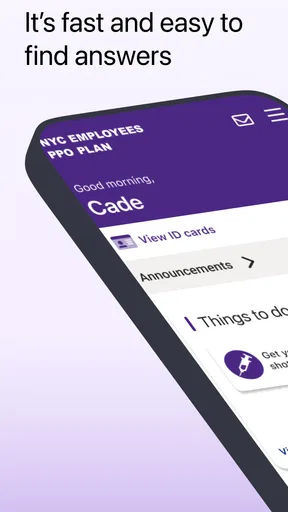
Getting access to a workplace health plan can be surprisingly awkward when the information is spread across cards, websites, phone calls, and separate medical services. NYC Employees PPO Plan is designed for a narrower moment: after I receive my member ID card, I can use this free medical app from UNITED HEALTHCARE SERVICES, INC. to access the NYCE PPO experience on a mobile device. That focused purpose is both its main strength and its biggest limitation.
I would not describe it as a general health tracker, symptom checker, or replacement for a doctor. It is more useful as a digital doorway for people enrolled in the NYC Employees PPO Plan. If that is my coverage, the app has a clear reason to exist. If it is not, installing it is unlikely to make sense because the service is tied to membership rather than casual health information.
What the app is really for after enrollment
The first practical detail is important: access begins after receiving the member ID card. That makes the card more than something to keep in a wallet. I would have it nearby during setup, especially if I am registering while traveling, changing phones, or trying to get organized before an appointment. Entering information from memory is an unnecessary source of mistakes, so using the card as the starting point is the sensible workflow.
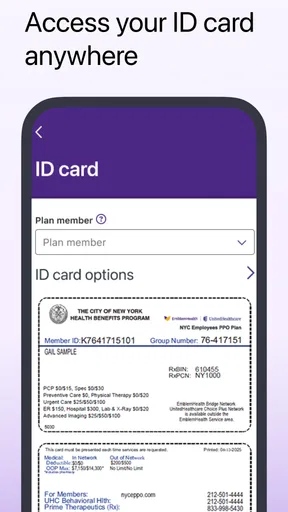
Once I am inside, the value comes from having plan-related access in one place instead of treating the physical card as my only reference. This is particularly useful when I need to check my coverage details during an appointment or when I am helping a family member organize healthcare paperwork. The app’s role is administrative and practical, not clinical. I would use it alongside my healthcare providers, not instead of them.
The listing identifies it as a medical app for Everyone, and the age label fits the straightforward nature of a member-access tool. Still, an Everyone rating should not be confused with universal eligibility. A person can be old enough to use the app and still need the correct NYC PPO membership before the app becomes useful.
Its store summary is brief, but that brevity tells me something about the intended audience. This is not trying to be a broad consumer platform with a long list of lifestyle tools. It is aimed at members who already know what the NYCE PPO plan is and want a mobile access point. That narrow design can feel refreshing compared with healthcare apps that bury basic plan tasks under unrelated wellness content.
Setup is where preparation matters most
My advice is to install it when I have a stable connection, the member ID card within reach, and enough time to complete the initial access process without rushing. The app is free, but free installation does not remove the need for valid membership information. If I am setting it up in a clinic waiting room, I would expect the experience to be more stressful simply because I may be distracted and dealing with a time-sensitive appointment.
A useful habit is to confirm that the app is the official one from UNITED HEALTHCARE SERVICES, INC. before entering personal information. That is especially important when searching an app store for a plan name that may resemble other healthcare products. The developer name is a helpful identity check, while the NYC Employees PPO Plan wording confirms that this is not a generic UnitedHealthcare app selected at random.
I would also keep the physical card available even after the app is working. A mobile tool is convenient, but a dead battery, a damaged phone, or an unexpected sign-in problem can turn a simple appointment into a frustrating one. The best workflow is not “app instead of card”; it is “app for convenience, card as a fallback.”
How it should feel during ordinary use
For a focused member-access app, I expect the basic experience to feel quick because the job is narrower than that of a full health-management platform. I am not opening it to edit a large personal database or browse a social feed. I am opening it to reach plan information and complete a small number of practical tasks. That limited scope should help the app feel less cluttered, although the exact speed will still depend on my phone, connection, and the service behind the login.
The current release is version 1.8.0, which suggests an app that has already moved beyond its earliest launch state. I would still judge it by how smoothly it handles the moments that matter: opening before an appointment, accepting membership details, returning to a previous session, and recovering when the network is unreliable. A clean first screen is less important than getting reliably from the app icon to the information I actually need.
One trade-off of a plan-specific app is that I may not open it frequently. That can make the first use after a long gap feel less familiar than a daily banking or messaging app. I would avoid assuming that an old session will remain ready forever. Keeping the app updated and knowing where the member card is can reduce friction when I return to it after several weeks or months.
There is also a difference between perceived speed and useful speed. An app can open quickly but still leave me waiting for account information from an online service. Conversely, a short loading moment may be acceptable if the information arrives correctly and the screen is easy to understand. For this kind of tool, I care more about predictable progress than flashy transitions.
Heavy-use moments are usually stressful, not frequent
This is not an app I would describe as demanding heavy daily use. The pressure appears in short bursts: a new member trying to activate access, someone preparing for a medical visit, or an employee checking plan information while away from home. Those moments can feel “heavy” because the task matters, even if the app itself is not processing entertainment content or complex media.
A realistic example is an employee who receives a member ID card shortly before scheduling care. At home, they install the app, use the card to begin access, and review the available plan information. Later, in a provider’s office, they open the app to confirm details instead of searching through a drawer for paperwork. That is where the app earns its place: not through constant engagement, but by shortening a specific administrative search.
Another scenario is helping a spouse or older relative manage plan information. In that situation, I would set up the app together rather than silently taking over the account. The member should understand which phone is being used, where the card is stored, and how to reach the information later. The app may simplify access, but it does not remove the need for careful handling of personal healthcare details.
For heavier use, I would pay attention to battery and connectivity in practical ways rather than expecting extraordinary resource demands. A small medical-access app should not be treated like a video editor or a graphically intensive game, but I would still avoid opening it for the first time on a nearly empty battery. If the app must contact an online service, poor reception can matter more than the phone’s processor.
The most useful advanced habit is to prepare before the urgent moment. I would test access at home, while connected to a dependable network, then make sure I know how to reach the app again. That does not guarantee every future session will be effortless, but it separates account setup from the pressure of standing at a reception desk.
Stability, recovery, and what to do when access goes wrong
The app has a 4.7 average from around 174 ratings, and it has passed the 10K-plus install mark. Those figures suggest that many users have found the experience worthwhile, but they do not guarantee that every device, network, or account situation will behave identically. I see the rating as encouraging rather than as proof that every recovery path is perfect.
Reliability matters differently here than it does in a game. I do not need a long uninterrupted session. I need the app to open when I need plan access, preserve a sensible path through sign-in, and avoid making me repeat the whole process unnecessarily. If a connection drops, I want a clear indication that the request did not finish rather than a screen that leaves me guessing.
If access fails, I would first check the simple causes: confirm that the phone is online, verify the member ID card details, close and reopen the app, and try again from a more stable connection. I would not repeatedly enter uncertain information, because a rushed series of guesses can create more confusion than the original problem. If the issue continues, the physical card remains important for contacting the appropriate plan support or presenting information at an appointment.
Recovery after changing phones deserves special attention. I would not assume that installing the app on a new device automatically transfers access. Before replacing a phone, I would make sure I can still identify the plan and locate the member ID card. This is a small preparation step, but it is more valuable for a healthcare app than spending time customizing an interface I may only open occasionally.
Stability also includes updates. The app was released on October 24, 2025, and its current version is 1.8.0. I would keep an eye on normal app-store updates rather than freezing the installation indefinitely. An updated release can be important when a service changes behind the scenes, especially for an app whose usefulness depends on connecting to current member access.
Device constraints and the right expectations
The minimum operating-system requirement is OS 9, which gives the app a relatively broad starting point for compatible devices. Even so, compatibility is not the same as a guarantee of an equally smooth experience on every phone. Older hardware may open the app adequately but feel slower when switching screens, loading online information, or returning from another application.
I would choose a device that receives current security updates whenever possible, particularly because this is a medical account tool. The app’s Everyone age label makes it approachable, but the sensitive nature of plan access means the phone itself should be protected with a screen lock and should not be casually shared. That is a device-use decision rather than a feature claim, but it directly affects the safety of using the app in everyday life.
Storage should not be the main concern for a focused app of this type, although I would still avoid installing it on a phone that is constantly failing to update applications. A full device can create confusing problems that look like app failures. Keeping reasonable free space, a working network connection, and a charged battery is basic advice, but it is especially practical when the app is needed during a healthcare visit.
I would also consider screen size and accessibility. A larger display can make plan information easier to read, while a very small or older screen may require more scrolling. If I am assisting someone with limited vision or dexterity, I would test the app with that person rather than assuming that a general Everyone rating means the interface will suit every physical need.
People who want a single app for exercise tracking, medication reminders, symptom journals, telehealth, and insurance administration should probably look elsewhere or use several tools together. NYC Employees PPO Plan is not positioned as a complete personal health hub. Its advantage is its specific connection to the NYC Employees PPO Plan, not breadth.
Where it beats ordinary alternatives—and where it does not
The usual alternative is a physical member card plus a browser search or a phone call. The card is dependable as a backup, but it can be easy to misplace and may not answer every question I have while away from home. A mobile access point is more convenient when I already carry my phone and need plan information quickly.
A general insurer app may offer a wider range of services, but wider is not automatically better. A broad platform can make me navigate through sections that do not apply to my plan. This app’s narrower identity may be an advantage for an NYC PPO member who wants a direct route rather than a large menu of unrelated health products.
On the other hand, a browser can be preferable when I am using a shared computer, working from a larger screen, or trying to print paperwork. A phone app is not the best tool for every administrative task. I would choose the app for quick mobile access and the browser or direct support route when I need a longer document review or assistance with a complicated coverage question.
This distinction helps set realistic expectations. The app can reduce the friction of finding plan access, but it cannot make healthcare administration simple in every situation. It does not eliminate provider questions, billing disputes, or the need to understand the terms of coverage. For those situations, a human support channel or official plan documentation may be more appropriate.
Who should install it and who should skip it
I would recommend it to an NYC Employees PPO member who has received the member ID card and prefers keeping plan access on a phone. It is also a sensible choice for someone who regularly moves between home, work, and medical appointments and does not want to rely on carrying every piece of paperwork.
I would be more cautious recommending it to someone who is not enrolled in this plan, because the app’s usefulness depends on that membership context. I would also suggest that people with very old devices check the operating-system requirement before planning around it. If a person rarely uses a smartphone and already has a reliable physical-card routine, the app may be convenient but not essential.
For me, the strongest use case is preparation: install it after the card arrives, complete access calmly, and keep the card as a backup. The weakest use case is downloading it without knowing whether the plan applies, then expecting a general insurance marketplace or health library. That mismatch can make a focused app seem disappointing when the real issue is choosing the wrong tool.
My performance verdict after looking at the complete experience
NYC Employees PPO Plan is a focused medical app rather than an all-purpose health companion. Its perceived speed should be judged by how quickly it gets a member from the phone to useful plan access, while its stability should be judged by dependable sign-in and sensible recovery when a connection or device causes trouble. I would not expect it to consume the kind of resources associated with media-heavy apps, but I would still prepare the phone and network before an important appointment.
The 4.7 average, free price, Everyone rating, 10K-plus installs, and ongoing version 1.8.0 release give it a reassuring profile for its intended audience. More importantly, the app has a clear job: make the NYCE PPO experience easier to reach after the member ID card is in hand. That clarity is valuable, even if it means the app has little appeal outside the plan.
My recommendation is straightforward: install it if you are an NYC Employees PPO member, set it up before you urgently need it, and keep the physical card available as your fallback. I would choose a broader healthcare app or a browser when I need a wider set of services, but for a member seeking a dedicated mobile entry point, this is a sensible and practical addition.
In everyday use, I see it as a convenience tool, not a complete healthcare solution. It can save time during the small but stressful moments when plan information is needed, provided I approach it with the right expectations. That focused role is enough to make it worthwhile for the people it was made for.
Verdict
Strengths of NYC Employees PPO Plan
- Provides broad healthcare coverage for eligible NYC employees.
- Includes access to a large network of participating doctors and hospitals.
- May reduce out-of-pocket costs for in-network medical services.
- Supports preventive care and routine health screenings.
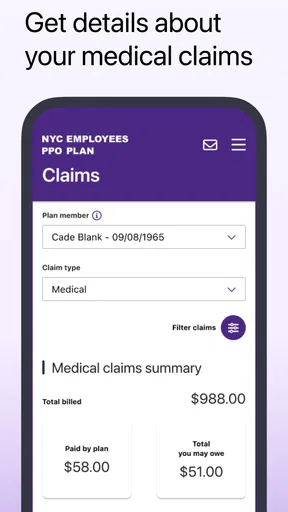
- Useful for comparing benefits, claims, and plan information in one place.
Limitations of NYC Employees PPO Plan
- Eligibility is limited to qualifying NYC employees and dependents.
- Out-of-network care may involve higher costs or limited reimbursement.
- Coverage details can vary by employment status and plan changes.
- Some services may require referrals, approvals, or medical documentation.
- Understanding deductibles, copays, and exclusions may take time.
Other Releases by UNITED HEALTHCARE SERVICES, INC.
View All
UnitedHealthcare
Medical4.6

UMR | Health
Medical4.4
Similar Picks in This Category
View All
WebMD: Symptom Checker
WebMD, LLC4.1

Microphone Amplifier
DOSA Apps4.2

Anatomy Learning - 3D Anatomy
3D Medical OU4.5

Period Tracker and Calendar
SimpleInnovation4.9

GoodRx: Prescription Coupons
GoodRx4.8

CVS Health
CVS Pharmacy4.5
Frequently Asked Questions
What is the NYC Employees PPO Plan app used for?
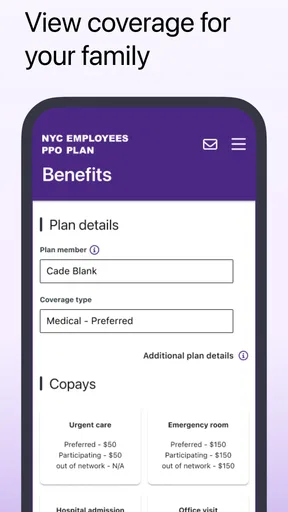
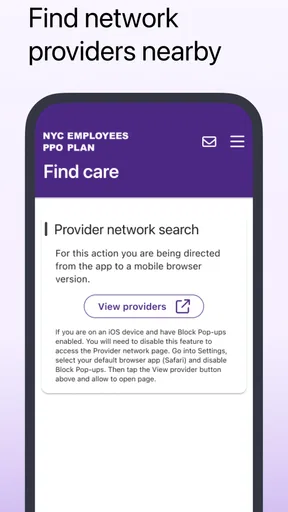
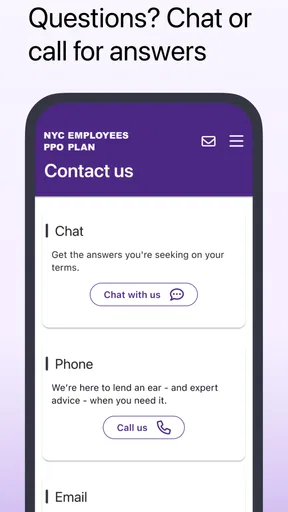
The NYC Employees PPO Plan app is designed to help eligible New York City employees and covered dependents manage health-plan information in one place. Depending on the features available through the current version, you may be able to review coverage details, access digital member information, search for providers, check claims or benefits, find contact resources, and obtain important plan documents without relying entirely on paper materials.
Who can use the NYC Employees PPO Plan app?
Access is generally intended for members enrolled in the NYC Employees PPO Plan, including eligible City employees, retirees, and covered dependents where permitted by the plan administrator. Registration may require identifying information such as a member ID, date of birth, or account credentials. Eligibility and available tools can vary, so users should confirm their enrollment and follow the official sign-in instructions provided by the plan.
Does the app replace my health insurance card or guarantee coverage?
The app may provide convenient access to digital member information, but it should not automatically be treated as a complete replacement for your physical insurance card or official plan documents. It also cannot guarantee that a treatment, provider, or claim will be covered. Before receiving care, verify network status, referrals, authorizations, deductibles, and exclusions directly through the plan’s official resources or member services.
Is the NYC Employees PPO Plan app free to download and use?
Downloading an official health-plan app is typically free, and members normally do not pay an additional fee simply to access account tools. However, using the app requires an internet connection, and your mobile carrier may apply data charges. The app also does not eliminate normal healthcare expenses such as copayments, coinsurance, deductibles, or other charges established by your specific plan.
What should I do if I cannot log in or find incorrect information?
If sign-in fails, first check that the app is updated, your credentials are entered correctly, and your device has a stable internet connection. Use the official password-reset or account-recovery option rather than sharing your login details. For incorrect eligibility, claims, provider, or coverage information, contact NYC Employees PPO Plan member services through an official channel, since app support may not be able to resolve benefit issues.
